Enhancement
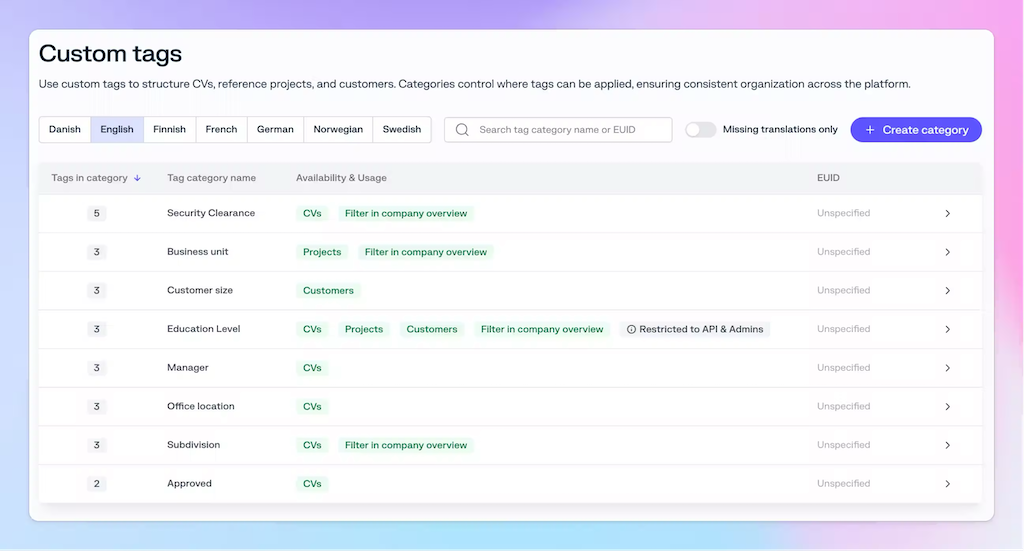
Redesigned Custom Tag Settings
Custom tags enable powerful search and filtering to quickly find people based on specific criteria like business unit, subdivision, clearances, or service areas. They allow you to mirror your company's organizational structure within the application, providing flexibility beyond rigid department hierarchies.
The redesigned interface includes several improvements to make managing your custom tags easier and more efficient:
- AI autotranslate: If you have the AI: Data Assistant add-on, you can now use AI to translate all the custom tag categories and custom tag values.
- Language picker - Seamlessly switch between languages when managing translations
- Filtering - Quickly find specific tags and categories
- Missing translations toggle - Show only categories and tags that need translations, making it easier to track down incomplete translations
- Bulk deletion - Remove multiple tags at once to streamline cleanup